
Feature · Multi-chapter reporting
See every chapter side by side
For organizations with several chapters: members, referrals, closed business, attendance and 1-to-1s for every chapter in one view, and a monthly report that shows which chapters may need support.
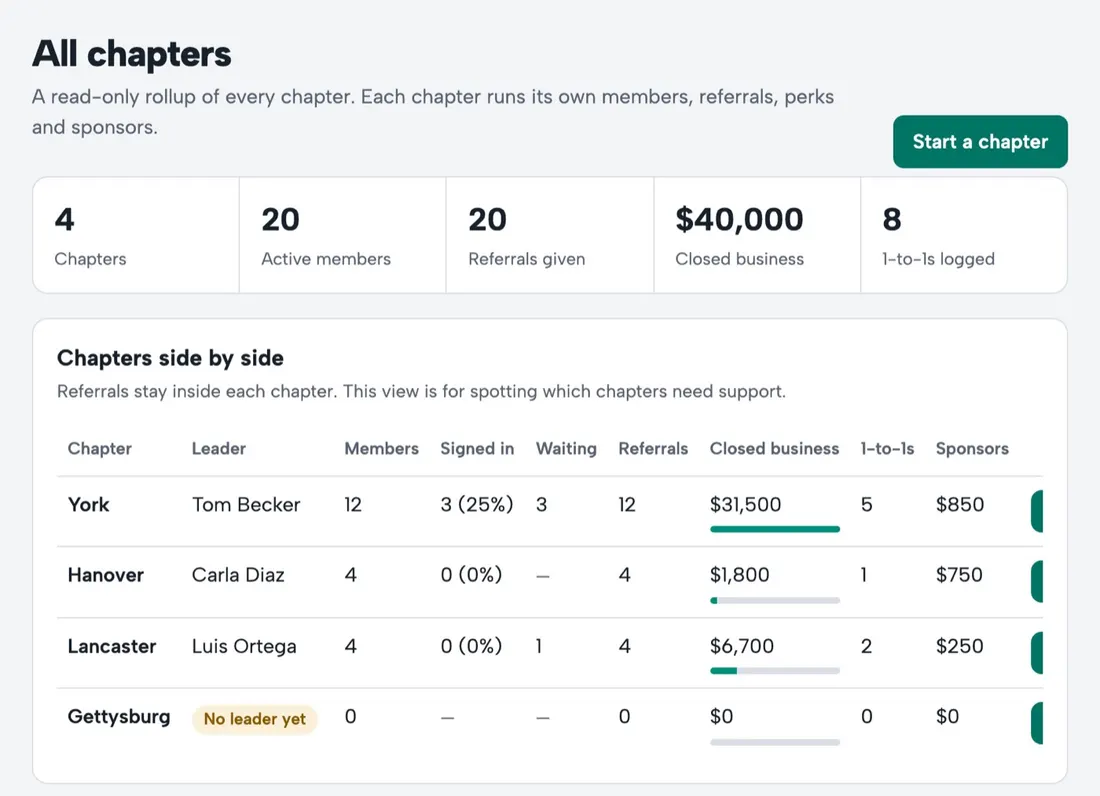
The organization overview
Each chapter's members, how many have signed in, join requests waiting, referrals given, closed business, 1-to-1s and sponsor funds, for any date range. Open any chapter's report in one click.
A monthly network report
On the first of each month: network totals, chapters compared, top givers across the network, and chapters that may need support. Emailed with a spreadsheet of the per-chapter numbers.
Aggregates, not contact details
The organization sees totals and member names, never the referred people's details. Those stay with the giver, the receiver and their chapter leader.
Start chapters in a day
Create a chapter, invite its leader, and it's ready the same day with its check-in screen, join link and website.
Questions
Can chapter leaders see other chapters?
No. Leaders see their own chapter. The organization's admins see every chapter's totals.